Using GraphDB to manage dynamic subscription

Recently we added functionalities for users to subscribe to their sports of interest so we can send them more personalized content. Given the dynamic nature of sports / match / fixture , I wanted the subscription topics flexible but still hierarchical. The idea was to enable someone to get each and every notification that happens on cricket or to choose a particular team / player etc and get more granular notification.

After trying to model the hierarchy into a RDBMS & document DB , we quickly realized traditional DB is just a bad fit for such recursive model design and the data retrieval queries will be too expensive.

This is finally the big enough problem when you can sell / justify introducing a completely new tool to address the issue. And my chance to use graph-db in production. I was introduced to the graph db concept to a previous project of mine and was really impressed by the ease of natural domain model mapping into the DB via the graph concept.

After some basic R & D, we decided to go with Orientdb. Having used elasticsearch cluster products , Orientdb clustering model seemed more natural compared to neo4j. Having said that, having a graph on a distributed cluster is not a easy problem which we realized later the hard way.

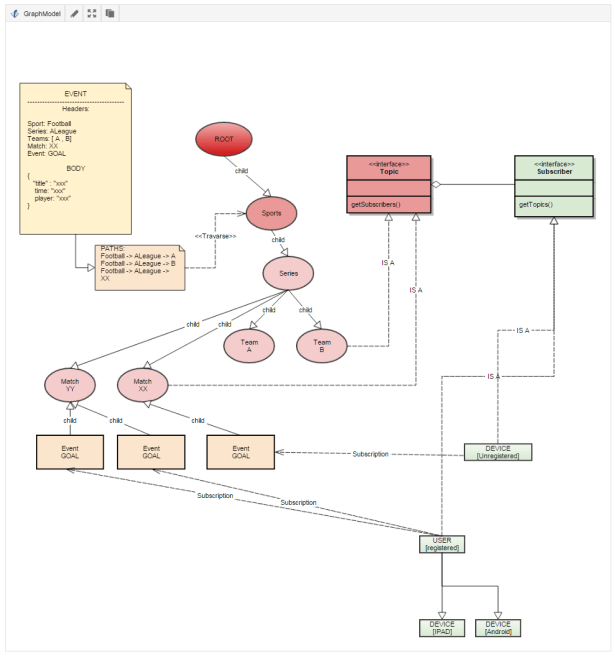
We could easily map our model in a graph schema like the following:

graph1

Notice how easily the concept of an unregistered device / user , and a user with multiple device fits into the domain. A user can subscribe to any node on the Tree that is Topic and the events automatically flows through the Subscriber.

This is how it looks like on Database:

sample

Performance:

With the default setup & no special tuning, the system is looking up 10,000 device-id to push the notification in < 500 ms , which is quite good for us. however, the orientdb-support tells us that it can be made even faster.

Lessons Learned:

>     We went with latest major production release 2.1 (which was released only 1 week ago) , and got burnt by many bugs / corner cases. It took upto 2.1.7 to finally have it stable.

>     Use TinkerPop (think jdbc for database) apis so you can switch between orientdb / neo4j

> If coding in java, use Frames api to maintain the Domain mapping

> Frames api is not properly tuned. I had to re-write most of my queries in gremlin . I am not sure about neo4j but orientdb recommends using gremlin / sql to run the search queries.

> Partition your clusters appropriately, it will result in proper utilization of all nodes in your cluster.

SumoShell – Become a shell ninja

Have you ever seen sys-admins doing awesome grep / awk queries and been amazed by it? Now you can do so too and in a much easier way!

A few months ago, I was writing some parser in sumologic and thinking this is so powerful, I wish I could run it on a regular text file. Well, I got a notification from google about sumoshell today.

And wait for it………they open sourced their parsing engine.

https://github.com/SumoLogic/sumoshell

What you can do with it? Wonders!


Here are some examples from their blog:


sudo tcpdump 2>/dev/null | sumo search | sumo parse "IP * > *:" as src, dest | sumo parse "length *" as length | sumo sum length by dest | render

Capture


OR:


tail -f logfile | sumo search "ERROR" | sumo parse "thread=*]" | sumo count thread | render-basic


NeoPhobia & Docker

Back in 2004 when I was starting my career, I read something about ‘NeoPhobia’ in Kathy Sierra’s blog. NeoPhobia is avoiding something new. Details: https://en.wikipedia.org/wiki/Neophobia

And we tend to be NeoPhobic in learning new things  by making excuse about it. Most common excuse?: ‘We dont need to learn about it because its not good enough for us’..We technologist do it all the time. We do it to save ourselves from the trouble of learning about it. Remember how many people didn’t like Git and wanted to stay in SVN?

I try to watch out and try not to be a NeoPhobic in terms of technology, but every now and then it creeps in! I remember installing Docker back in 2013 and playing around with it. To be fair , docker wasn’t as smooth back then and the experience was not good enough. But still , I discarded it as a viable tool.

Fast forward 2 years and I was forced to look into docker again (Because of licensing issue, we had to run multiple microservice mule container in same server but still wanted isolation)…And my opinion? Its a crime not to know / use docker , and I have been committing it so far!!!

Even if you don’t run multiple containers in production , don’t have  needs for virtualisation, you MUST learn docker. Within my first week of learning docker, I am already using it for so many things. Don’t know a thing about NPM and still want to run a Node server ? Want to test 5 node hazlecast cluster in your mini laptop but dont have enough processing power? Limited by Mule licensing and deploying all your microservice in one container with no isolation?  Look no more..Docker is your friend!

Taking ThreadDump from Java Code

Copied from HERE with some code modification.

import java.io.ByteArrayOutputStream;
import java.io.UnsupportedEncodingException;
import java.lang.management.ManagementFactory;
import java.util.Scanner;
import java.util.concurrent.Executors;
import java.util.concurrent.ScheduledExecutorService;
import java.util.concurrent.TimeUnit;
import java.util.concurrent.atomic.LongAdder;

public class StackTraceUtils {
	private static final char PID_SEPERATOR = '@';
	private static String pathToJStack = "jstack";


	private static String acquirePid()
	{
		String mxName = ManagementFactory.getRuntimeMXBean().getName();

		int index = mxName.indexOf(PID_SEPERATOR);

		String result;

		if (index != -1) {
			result = mxName.substring(0, index);
		} else {
			throw new IllegalStateException("Could not acquire pid using " + mxName);
		}

		return result;
	}


	public static String executeJstack()
	{
		ProcessInterface pi = new ProcessInterface();

		int exitCode;

		ByteArrayOutputStream byteArrayOutputStream = new ByteArrayOutputStream();

		try {
			exitCode = pi.run(new String[] { pathToJStack, "-l", acquirePid(),}, byteArrayOutputStream);
		} catch (Exception e) {
			throw new IllegalStateException("Error invoking jstack", e);
		}

		if (exitCode != 0) {
			throw new IllegalStateException("Bad jstack exit code " + exitCode);
		}


		try {
			String str = new String(byteArrayOutputStream.toByteArray(), "UTF-8");
			return str;
		} catch (UnsupportedEncodingException e) {
			throw new RuntimeException(e);
		}

	}

	public static void main(String[] args) {

		final String s = executeJstack();
		System.out.println("s = " + s);
	}
}


import java.io.BufferedReader;
import java.io.BufferedWriter;
import java.io.File;
import java.io.IOException;
import java.io.InputStream;
import java.io.InputStreamReader;
import java.io.OutputStream;
import java.io.OutputStreamWriter;
import java.util.HashMap;
import java.util.HashSet;
import java.util.Map;
import java.util.Map.Entry;
import java.util.Set;

public class ProcessInterface
{	
	private final Map<String, String> addModifyEnv;
	private final Set<String> removeEnv;
	
	static class StreamGobbler extends Thread
	{
		private static int gobblerNumber = 0;
		
		private final InputStream is;
		private final OutputStream os;
		
		private static synchronized int getNextGobblerNumber()
		{
			return gobblerNumber++;
		}
		
		public StreamGobbler(InputStream is, OutputStream os)
		{
			super("StreamGobblerThread-" + getNextGobblerNumber());
			
			this.is = is;
			this.os = os;
		}
		
		@Override
		public void run()
		{
			try
			{
				OutputStreamWriter osw = new OutputStreamWriter(os);
				BufferedWriter bw = new BufferedWriter(osw);
				
				InputStreamReader isr = new InputStreamReader(is);
				BufferedReader br = new BufferedReader(isr);
				
				String line = null;
				
				while ((line = br.readLine()) != null)
				{
					bw.write(line);
					bw.newLine();
				}
				
				bw.flush();
				osw.flush();
			}
			catch (IOException ioe)
			{
				throw new IllegalStateException(ioe);
			}
		}
	}
	
	public ProcessInterface()
	{
		this.addModifyEnv = new HashMap<String, String>();
		this.removeEnv = new HashSet<String>();
	}
	
	public void removeEnv(String name)
	{
		if (addModifyEnv.containsKey(name))
		{
			addModifyEnv.remove(name);
		}
		
		removeEnv.add(name);
	}
	
	public void addEnv(String name, String value)
	{
		if (removeEnv.contains(name))
		{
			removeEnv.remove(name);
		}
		
		addModifyEnv.put(name, value);
	}
	
	public int run(String[] command) throws InterruptedException, IOException
	{
		return run(command, null, null, null);
	}
	
	public int run(String[] command, File workingDir) throws InterruptedException, IOException
	{
		return run(command, null, null, workingDir);
	}
	
	public int run(String[] command, OutputStream os) throws InterruptedException, IOException
	{
		return run(command, os, os, null);
	}
	
	public int run(String[] command, OutputStream os, File workingDir) throws InterruptedException, IOException
	{
		return run(command, os, os, workingDir);
	}
	
	public int run(String[] command, OutputStream std, OutputStream err, File workingDir)
			throws InterruptedException, IOException
	{
		StringBuilder sb = new StringBuilder();
		
		for (String s : command)
		{
			sb.append(s);
			sb.append(" ");
		}
		
		ProcessBuilder builder = new ProcessBuilder();
		
		if (workingDir != null)
		{
			builder.directory(workingDir);
		}
		
		Map<String, String> env = builder.environment();
		
		for (String name : removeEnv)
		{
			env.remove(name);
		}
		
		for (Entry<String, String> entry : addModifyEnv.entrySet())
		{
			env.put(entry.getKey(), entry.getValue());
		}
		
		builder.command(command);
		
		Process process = builder.start();
		
		OutputStream outStream = ((std == null) ? System.out : std);
		OutputStream errStream = ((err == null) ? System.err : err);
		
		StreamGobbler outputGobbler = new StreamGobbler(process.getInputStream(), outStream);
		StreamGobbler errorGobbler = new StreamGobbler(process.getErrorStream(), errStream);
		
		outputGobbler.start();
		errorGobbler.start();
		
		int exitVal = process.waitFor();
		
		return exitVal;
	}
}


This can be very helpful, for example in a code block you suspect there is a deadlock, for Example timeout from connection pool , you can log the stacktrace so you can come back later and run a ThreadDump analysis tool on it. Add it to your code before the Operations guy restart your problematic server and report an issue in your name !

My Journey with Mule

Stage 1 : Drag & Drop, Enterprise Integration Patterns , Oh So Cool!!

Stage 2 : What the ****  $$$!!!??? IDE Sucks, weird behavior , silent xml config alteration ….How can anyone work on this!!! Going back to my core java apps…

Stage 3 (Used to all the quirks of Mule Studio) : Hmmm…I see the point..not so bad after all !!! Just built an entire state machine system app with DB integration / HTTP & TCP Endpoints in 90 mins!

Stage 4: Wait, they hid all the cool features in EE edition 😦 … I am supposed to debug my app only with log messages!! Thats almost as bad as the time when I used to write EJB code! hmmmm….start looking for alternative? How is that spring integration project coming along? 

Adding Functional power in Java programs

I am digging the Functional style power in my everyday regular programming. I was implementing some failover connection setup in a pure Java code and thought about adding the ugly java command pattern as an alternative to closure. At the end, the code turned up not so bad so I thought I would share it.

Problem:

We have two Quentin Server – Server A & Server B (A kind of recording server used in broadcast industry). The QuentinApi abstracts the interaction with the server which maintains some persistent TCP connection. Now the requirement is, we have to keep talking to Server A. However, if the connection is not valid / or it went down for some reason, we need to switch back to Server B.

Here is how the Quentin Api Looks like:

/**
 * 
 * Api to create/update/delete clips on Quantel. Clips are actually created from the channel. The quantel system has a pool of server. 
 * Every server has a fixed number of channel. 
 * 
 * @author smoinuddin
 *
 */
public interface QuentinApi {
	
	public String createClip(String clipName, int server, int channel, DateTime startTime, DateTime endTime) throws QuantelServerLookupFailedException, QuentinApiException;
	
	public void updateClip(String clipName, int server, int channel, DateTime startTime, DateTime endTime) throws QuentinApiException;
	
	public void cancelRecording(String clipName, int server, int channel) throws QuentinApiException;
      ...... // some more similar methods....	
}

Now all of these method should have the feature of failure detection and should revert to Server B whenever there is a problem. I have solved similar problem before with Java using Dynamic Proxy and Spring AOP, but I thought using Functional Closure style is simpler and easier to understand.

public class QuentinApiFailoverProxy implements QuentinApi {
	private static final Logger LOGGER = LoggerFactory.getLogger(QuentinApiFailoverProxy.class);
	
	private QuentinApiImpl quantelServerA;
	private QuentinApiImpl quantelServerB;
	
	private QuentinApiImpl currentConnection;
	
	public QuentinApiFailoverProxy(QuentinApiImpl quantelServerA,
			QuentinApiImpl quantelServerB) {
		super();
		this.quantelServerA = quantelServerA;
		this.quantelServerB = quantelServerB;
		
		this.currentConnection = quantelServerA;
	}
	
	private abstract class QuantelApiCall<T> {
		abstract T execute() throws QuentinApiException;
		
		public  String toString() {
			return null;
		}
	}
	
	private <T> T execute(QuantelApiCall<T> call) throws QuentinApiException{
		if(call.toString() != null) {
			LOGGER.debug("***executing Call: {}", call);
		}
		try {
			if(currentConnection.validate()) {
				return call.execute();
			} else {
				LOGGER.warn("Could not validate current connection: " + currentConnection);
				throw new QuantelCommunicationException("Could not validate current connection: " + currentConnection);
			}
		} catch (QuantelServerLookupFailedException | 
				QuantelCommunicationException | 
				NullPointerException| 
				org.omg.CORBA.COMM_FAILURE |
				org.omg.CORBA.OBJECT_NOT_EXIST e) {
			
			LOGGER.warn("Corba Failed to talk to {}", currentConnection, e);
			resetConnections();
			LOGGER.warn("Trying to talk to {}", currentConnection);
			
			return call.execute();
		} finally {
			if(call.toString() != null) {
				LOGGER.debug("***finished executing call: " + call);
			}
		}
	}
	
	private synchronized void resetConnections() throws QuantelCommunicationException {
		boolean validCurrentConnection = false;
		try {
			currentConnection.reset();
			if(currentConnection.validate()) {
				validCurrentConnection = true;
			}
		} catch (Exception e) {	}
		
		if(!validCurrentConnection) {
			currentConnection = getAlternative();			
			currentConnection.reset();
			if(!currentConnection.validate()) {
				LOGGER.warn("Failed to talk to main connection & alternative connection . Alternative connection just tried = {}" , currentConnection);
				throw new QuantelCommunicationException("Failed to talk to main connection & alternative connection . Alternative connection just tried: " + currentConnection);
			}
		} else {
			LOGGER.warn("re-initiated the current connection to {}");
		}
		
	}

	private QuentinApiImpl getAlternative() {
		if(currentConnection.equals(quantelServerA)) {
			return quantelServerB;
		} else {
			return quantelServerA;
		}
	}    

	@Override
	public String createClip(final String clipName, final int serverId, final int channel,
			final DateTime startTime,final  DateTime endTime)
			throws QuantelServerLookupFailedException, QuentinApiException {
		
		return execute(new QuantelApiCall<String>() {
			@Override
			String execute() throws QuentinApiException {
				return getCurrentConnection().createClip(clipName, serverId, channel, startTime, endTime);
			}

			@Override
			public String toString() {
				return "createClip: " + clipName ;
			}});		
	}

	@Override
	public void updateClip(final String clipName,final  int server,final  int channel,
			final DateTime startTime, final DateTime endTime) throws QuentinApiException {
		execute(new QuantelApiCall<Object>() {
			@Override
			Object execute() throws QuentinApiException {
				getCurrentConnection().updateClip(clipName, server, channel, startTime, endTime);
				return null;
			}

			@Override
			public String toString() {
				return "Update Clip: " + clipName;
			}});	
	}

	private QuentinApiImpl synchronized  getCurrentConnection() {
		return currentConnection;
	}

.................. and so on.
}

Notice how the execute method wraps each method call and adds exception handling, reset connection, try alternative connection feature. Introducing the QuantelApiCall lets us bundle our code and pass it as an argument to another method (Code as object). Again the execute() call does not take any parameter, instead it uses static binding functionality with the local variable to carry them over to the new context.

One thing you need to be cautious is to use the getCurrentConnection() in the closures to enable java dynamic binding. If I used the currentConnection instead, the currentConnection at the time of ‘Closing’ (aka Creating the closure object) would be used everytime you call execute(). But methods are always dynamically bounded and will be reevaluated with every call of the execute().

Again, the code can be called by multiple thread at the same time so you need synchronization in the reset() call (You don’t want two threads trying to reset the connection at the same time). Other interesting thing is you need ‘synchronized’ on the getCurrentConnection to avoid Thread data caching issue. I have noticed a lot of java developer mistakenly think synchronized is only used for mutual exclusion but it is also necessary for visibility of the data.
Will scala become obsolete with java 8?

I have been investing a lot of my free time in Scala lately. Although I have been injecting groovy heavily in all my projects whenever I get a chance, I miss the safety of Type system (too much java does that to you).

Even though I had some previous Erlang experience and background knowledge of Actor Model, I must admit Scala has a steeper learning curve than I thought.It requires significant time and energy invested before you can do anything useful with it. I can imagine I’d have a hard time if I wanted to push it to a team of java devs. On the other hand, Groovy is too easy to adopt, you write your java code in a script and in no time fall in love with the power of functional language with Java goodies in your hand.

That brings the question in my mind, will scala be obsolete with java 8? A lot of scala goodies will face serious competition with java 8. Developers will eventually adopt those feature sooner or later if they want to keep their job but I don’t see mass adoption of scala. Don’t get me wrong, I am loving scala and no doubt its an elegant language but I don’t see it as a successful complement language of Java with java 8 in the picture. On the other hand, I can imagine myself doing all my scripting / hacking jobs in Groovy as a replacement of my broken perl skills.